Portable world-building with touch-first map editing tools
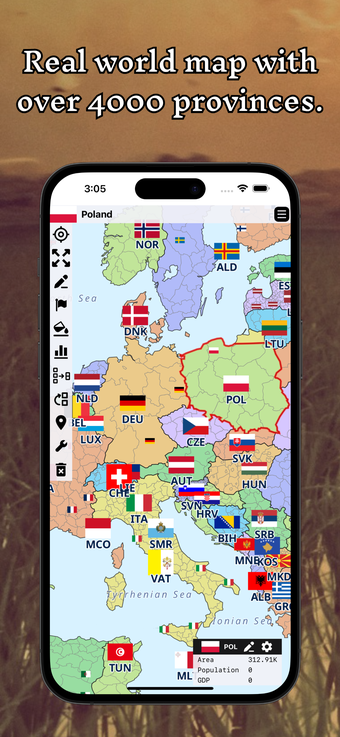
A World Map Editor Sandbox, by Hsin Yee Low, is an iPhone app for building fictional and alternate-history maps. It lets players paint terrain, set political borders, place labels, and assemble scenario snapshots in an open sandbox environment that favors creative mapping over mission goals. The editor saves multiple projects, includes basic templates and a real-world layout, and uses touch-optimized zoom and pan for detailed work. Map hobbyists, tabletop DMs, and students get a portable canvas for visualizing geopolitical ideas and alternate histories.
A deliberate sandbox that centres player decisions over objectives
Step into a blank canvas where the primary tension is what you choose to create, and how those choices reshape a world. So, the app frames map-making as a narrative act: drawing landforms and naming places gives meaning to later scenarios. The design emphasises creative freedom, not scripted missions, which suits users who prefer open-ended projects to fixed goals.
Touch-first controls and project tools make mobile editing practical
The interface is built for handheld use, with zoom and pan controls tuned for touch so you can work at close scale. Save and load lets you keep multiple worlds in progress, and basic templates or a real-world layout provide quick starting points. Thus, the tool supports iterative workflows where you refine coastlines, borders, and labels across several sessions.
Light onboarding requires players to self-direct their learning
The app offers a blank canvas option alongside simple templates, so new users either start from scratch or modify an existing layout. That approach reduces hand-holding; players who prefer step-by-step tutorials may find the entry experience sparse. Strong creative direction from the user replaces structured progression, so preparedness and a clear project plan improve early results.
Replay value tied to scenario design and multiple projects
Scenario creation for historical, fictional, or futuristic states rewards repeat play, because each saved project becomes a distinct thought experiment. Sharing relies on standard iOS features and screenshots, which keeps collaboration informal. Compared with desktop editors, the app brings core world-building tools to iPhone and iPad, prioritising portable, touch-based editing over heavyweight feature sets.
A World Map Editor Sandbox is a focused choice for self-directed mapmakers
A World Map Editor Sandbox suits players who enjoy shaping worlds without preset objectives, especially tabletop DMs and study-driven creators seeking a mobile sketchbook. It demands that users supply their own goals and workflow, which rewards those who like iterative tinkering but limits appeal for users who expect guided progression. The result is a compact, creation-first tool for portable cartography.
Pros
Touch-optimized zoom and pan supports detailed mobile editing
Scenario tools let you define historical, fictional, or futuristic states
Save and load handles multiple projects simultaneously
Cons
Design prioritizes creative freedom over guided, mission-based play
Included templates are basic rather than extensive
Sharing is via standard iOS features or screenshots, not integrated collaboration
Laws concerning the use of this software vary from country to country. We do not encourage or condone the use of this program if it is in violation of these laws. Softonic may receive a referral fee if you click or buy any of the products featured here.